
Table of Contents
MyRO Costumes
MyRO is a costume Heaven. All 2700+ costumes are available by playing, no donations needed! Costumes are obtained by costume boxes from events, rare drops from mobs, and shops.
Collecting & Sorting
 Instead of storing costumes in your storage at Kafra and taking up so much space, consider placing the costumes in the wardrobes, but continue reading before you do! Wardrobes can be found in the Residential Houses or in the school building just to the left of Prontera spawn.
Once you click Store Costume and trade in your costume, the costume is placed into the wardrobe, it then becomes account-bound and untrade-able (item will be yellow in your inventory when you pull it out).Costumes from the wardrobe cannot be removed once placed in! Duplicate costumes will NOT store even if put in the trading menu.
Use Get Costume to pull an account-bound costume out for use. You can also use the costume on multiple characters at the same time (as long as they are on the same account) by using Get Costume.
Get Costume will also show you how many costumes you have collected over all. Once 2000 costumes are collected in total, you can customize your costume layering. Meaning if you want 2 upper costumes on, you can customize one to be worn on the mid/lower slot (also under Get Costume - Custom View ID Config), so you can wear both at the same time! This works for upper/mid/lowers only (no garments or event costumes.)
Other Wardrobe features
You can access a Stylist in the wardrobe to help your outfit as well!
Your event shop wings/costumes will be under Event Costumes.
Seasonal Costumes are special sprites that will last until relog or removed via wardrobe. These sprites cannot use skills or attack!
Remove Bound Costumes removes the account-bound/untrade-able (yellow) costumes from your inventory.
The Mirror option allows you to pre-save outfits to quick change. This will save your costumes, clothing color, and hair styles. It will not save sprites, those must be manually changed. The mirror will pull the costumes out of your wardrobe for the outfit! At the myRO Costume Trader NPC, you can also purchase a Pocket Mirror for 500 points, to allow outfit changes on the go.
Find Missing Costumes allows you to see what costumes you do not own. You can preview these costumes via the item description as usual.
Other Costumes:

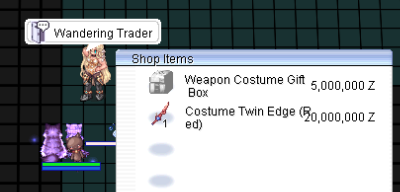 The Wandering Trader has 1 random box weapon costume box for 5mil and 1 specific weapon costume for 20mil every 30 minutes. Once the 1 item is sold out, the item will become greyed out. When it is in stock, there will be a 1 under the items icon.
The merchant changes spawn/maps every 30 minutes, to random coordinates. When it respawns the random 1 box is restocked and the 1 specific weapon costume is changed. (If you are on the map the Trader spawns on, there will be an announcement.)
The Wandering Trader has 1 random box weapon costume box for 5mil and 1 specific weapon costume for 20mil every 30 minutes. Once the 1 item is sold out, the item will become greyed out. When it is in stock, there will be a 1 under the items icon.
The merchant changes spawn/maps every 30 minutes, to random coordinates. When it respawns the random 1 box is restocked and the 1 specific weapon costume is changed. (If you are on the map the Trader spawns on, there will be an announcement.)
Costumes available in the server can be found in the Wardrobe under “Find Missing Costumes > Weapons”
Aura Costumes are awarded only to Permadeath characters. Once a Permadeath character reaches level 99, you are awarded 2 Aura Costume boxes via the Achievements tab (then mail). These can be stored in the wardrobe and used on regular characters though.
Costume Commands
@hidewings - hides all costume wings
@hidebigcostumes - hides extra large costumes
@hidecostumes - hides all costumes
@hideweapons - hides weapon costumes
@hidejobsprites - hides other renewal class sprites
'' — Nichi 2026/02/18 23:46''